Make your photo now
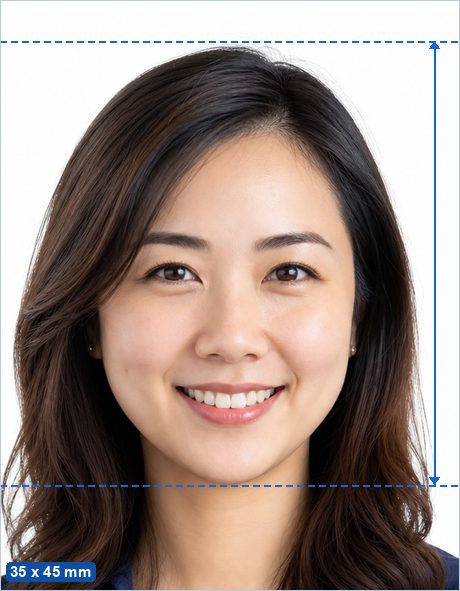
The My Number card (マイナンバーカード) photo is 35 mm wide by 45 mm tall — the same format as a Japanese passport photo — taken within the last six months, face-on, bareheaded, against a plain light background with no shadow. It is submitted with the card application at your municipal office, or uploaded when applying online.
Make my Japan My Number Card Photo now →
Not sure whether your photo will pass? See Why ID photos get rejected.
Japan My Number Card Photo requirements
| Photo size | 35 x 45 mm (1.38 x 1.77 in) |
|---|---|
| Pixels (print) | 413 x 531 px at 300 DPI · 827 x 1063 px at 600 DPI |
| Head height | 32–36 mm from chin to crown — typical ICAO guidance (not separately published for this document). |
| Background | Plain white or light gray. |
| Glasses | Allowed if there is no glare, no tint, and the frames do not cover the eyes. |
| Editing | Keep edits minimal; most authorities reject retouched photos even where no explicit rule is published. |
| Expression | Neutral expression, mouth closed, both eyes open, facing the camera straight on. |
| Official source | Official photo requirements ↗ |
Good to know
Japanese municipal offices are known for checking the background carefully: a shadow behind the head is the most common reason a submitted photo is sent back. Stand well away from the wall.
The same 35 x 45 mm crop works for a Japanese passport, a residence card renewal and most Japanese licence applications, so one sheet covers several errands.
How to make it in 3 steps
- Take or choose a photo. Stand in front of a plain light wall in even light with no shadows, camera at eye level about 2 m away, head and shoulders in frame with space around your head.
- Crop with the head guides. The maker opens preset to the 35 x 45 mm standard with the official 32–36 mm head range marked. Drag and zoom until the crown of your head and your chin sit on the guides, then run the built-in photo check.
- Download. Save the single photo (for online uploads) or the 4 x 6 in print sheet, and print it at any photo shop, pharmacy photo kiosk or at home for the price of a regular photo print.
Frequently asked questions
What size is a Japan My Number Card Photo?
35 x 45 mm — 413 x 531 px at 300 DPI. The head must measure 32–36 mm from chin to the top of the head.
What background color does a Japan My Number Card Photo need?
Plain white or light gray.
Can I take a Japan My Number Card Photo at home with my phone?
Yes. Stand in front of a plain light wall in even daylight, have someone take a sharp, front-facing photo from about 2 m away, then crop it to the exact 35 x 45 mm standard with the free maker — the head guides show you the official head-height range.
Is this Japan My Number Card Photo maker really free and private?
Yes — completely free, with no ads, no watermark and no signup. Unlike photo-booth apps and paid services, your photo is processed entirely in your browser and is never uploaded to any server.
Where can I print my Japan My Number Card Photo?
Download the 4 x 6 in (10 x 15 cm) sheet and print it as an ordinary borderless 4 x 6 in (10 x 15 cm) photo at actual size (100%, no scaling) at a photo shop, a pharmacy photo kiosk, an online print service or on a home printer, then cut along the guide lines. You pay only for an ordinary photo print, not a photo-booth service fee. More detail: Printing passport photos in Japan.
What size photo is needed for a My Number card?
35 mm wide by 45 mm tall (縦4.5cm × 横3.5cm), taken within the last six months, face-on and bareheaded against a plain light background with no shadow.
Can I use the same photo for a My Number card and a Japanese passport?
Yes — both use the 35 x 45 mm format with the same framing, so a single crop serves both, provided the photo is recent enough for each application.