Choose photo size & upload
Click to choose a photo or drag & drop it here
JPEG, PNG, WebP or HEIC. Use a sharp, well-lit, front-facing portrait.
No photo handy? Try an example portrait
- Stand in front of a plain, light background with even lighting and no shadows.
- Look straight at the camera with a neutral expression, mouth closed, eyes open.
- Leave space around your head — you will crop precisely in the next step.
Print your ID photo at a pharmacy, photo shop, or at home
No special paper, app, or settings needed — the 4x6 sheet from Step 3 prints like any other photo.
- Download the 4 x 6 in (10 x 15 cm) sheet in Step 3 above — it is the size photo kiosks and print services expect.
- Upload it through a photo print app or website, or bring it on a USB drive or phone to an in-store kiosk.
- Choose a 4 x 6 in, borderless, actual-size (100%) print — do not let the store crop, scale, or auto-enhance it.
- Pick up your print and cut along the thin gray guide lines to separate the individual photos.
Prefer to print at home? Any inkjet or laser printer works — just print the same sheet at 100% scale on 4x6, A4, or US Letter photo paper.
How it works
Choose an official size (standards for over 40 countries — US 2x2 in, US passport online renewal digital photo, Schengen 35x45 mm, and more), upload a portrait, line up the head guides, and download a single photo or a print-ready 4x6/A4 sheet for any pharmacy photo kiosk or photo shop. You can optionally replace the background with white, gray, blue, or red — using on-device AI person segmentation (MediaPipe Selfie Segmentation, Apache 2.0), with no upload. Careful: some authorities, including the U.S. State Department, require the original unedited photo and reject replaced backgrounds — the app warns you when that applies. The app packs as many photos as fit on your paper edge to edge and adds thin cut lines. All processing happens locally in your browser — no upload, no ads, no watermark, no cost, and no signup. Requirements vary by authority; always double-check the official rules before submitting.
Photo requirements by country & document
Every document below has its own page with the official size, head height, background rules, and a one-click link that opens the maker preset to the right standard.
Requirements in your language
Accepted and rejected examples
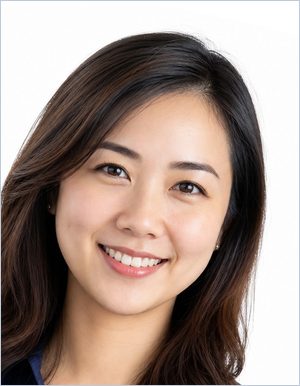
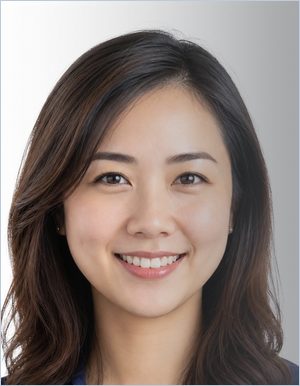
The same portrait, altered one property at a time. Most refusals come down to one of these — all visible before you submit.
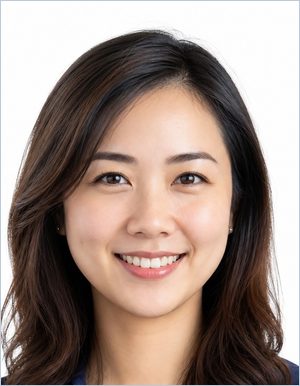
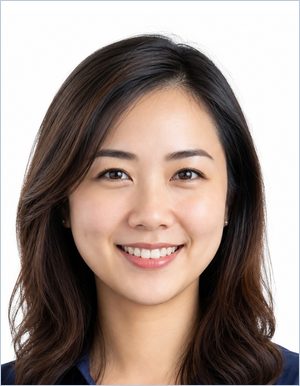

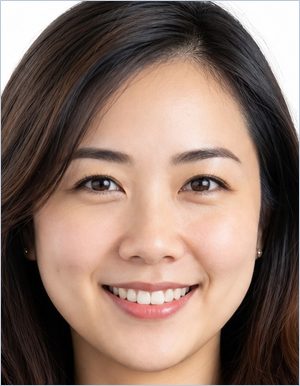
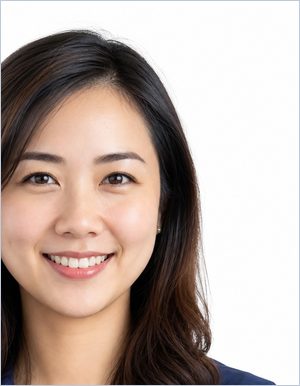

All nine reasons ID photos get rejected, in detail (in English) →
Frequently asked questions
Where can I print my ID photo?
Download the 4x6 in or A4 sheet, then print it at any pharmacy photo kiosk, photo shop, online print service, or on a home printer as a regular borderless 4x6 photo at actual size (100%, no scaling) — no special paper or settings needed. Cut along the guide lines to separate your individual photos.
What size print do I need for a passport or ID photo sheet?
A 4 x 6 in (10 x 15 cm) print is the standard size accepted by photo kiosks and print services almost everywhere. A4 works well for home printers; 3.5x5 in, 5x7 in, and US Letter are also available.
Do I need special photo paper to print my ID photo?
No. Standard glossy or matte 4x6 photo paper from a photo kiosk or print service is enough. The app lays out your photos at 300 or 600 DPI so they print sharp at actual size.
Is this really free, and are there ads or watermarks?
Yes — it is completely free, with no ads, no watermark, no account and no usage limits. Your photo is processed entirely in your browser and is never uploaded anywhere.
Will an AI-edited or replaced background get my U.S. passport photo rejected?
For U.S. passport online renewal specifically, yes — the State Department rejects AI-edited or digitally replaced backgrounds and checks every submitted photo. Use the app's unedited settings (background replacement off, brightness and contrast at 100%) for that use case, and photograph yourself in front of a real plain white wall.
Read the full explainer on the 2026 AI photo policy (in English) →