Make your photo now
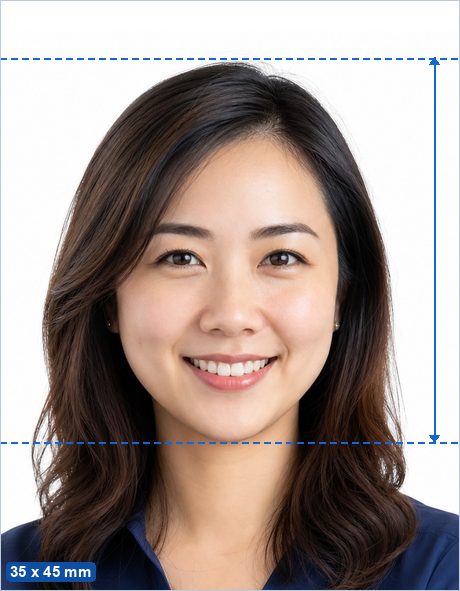
Need a Singapore Passport & ID Photo? Upload any sharp, front-facing portrait and this free maker crops it to the same proportions as ICA's 400 x 514 px upload, checks it against the published rules, and gives you both a digital photo sized for MyICA and a print-ready 4 x 6 in sheet for a counter application — entirely in your browser, with no ads and no watermark.
Make my Singapore Passport & ID Photo now →
Not sure whether your photo will pass? See Why ID photos get rejected.
Singapore Passport & ID Photo requirements
| Photo size | 400 x 514 px for the MyICA upload — no millimetre size is officially published. A 35 x 45 mm print has the same proportions for a counter application. |
|---|---|
| Pixels (print) | 413 x 531 px at 300 DPI · 827 x 1063 px at 600 DPI |
| Head height | 25–35 mm from chin to crown — typical ICAO guidance (not separately published for this document). |
| Background | Plain white. |
| Glasses | Allowed if there is no glare, no tint, and the frames do not cover the eyes. |
| Editing | Must be original and unedited — retouching, filters and replaced backgrounds are explicitly banned for this document. |
| Expression | Neutral expression, mouth closed, both eyes open, facing the camera straight on. |
| Official source | Official photo requirements ↗ |
Good to know
ICA accepts photos taken within the last three months, against a plain white background without shadows. Glasses are allowed only with clear, untinted lenses and no glare.
Singapore specifics
Do you bring your own photo for a Singapore passport or NRIC?
You supply a digital photo, not a print. Singapore passport applications and Identity Card (IC, the NRIC) registrations and re-registrations run through ICA's MyICA e-Service with Singpass, and each asks for a passport-sized, digital, colour photograph taken within the last three months. ICA warns that an application is delayed if the photo fails its guidelines and that you will be told to submit a new one. ICA does not take your photo for you. The upload format is fixed: 400 x 514 pixels in jpg, jpeg, heic, heif or png, up to 8 MB. Only a counter application at the ICA Services Centre or an overseas mission, which costs S$80 instead of S$70 online, uses a printed photo, and that print must be matte or semi-matte.
The tool fits here: photograph yourself against a white wall in even light, crop with the 35 x 45 frame, which has the same proportions as 400 x 514 pixels, and resize the export to exactly 400 x 514 before uploading. Keep the printable sheet only for a counter application. ICA advises against selfies and any editing of facial features.
Where to print a passport photo in Singapore
Passport and IC photos are uploaded, so printing matters mainly for counter applications and visas. Studios publish prices; booth operators generally do not.
- H2 Photo Studio, 28 Sin Ming Lane, Midview City: S$50 per person for a studio session with a digital copy by email, ICA-compliant sizing, a 15-minute turnaround and a free retake if rejected (studio page, 2026); digital only.
- Hong Ray Photography, Clementi, Bukit Batok and Jurong East: S$95 for a 20-minute express session with digital copies, plus S$10 for 8 Singapore passport-size prints (studio page, 2026).
- Mall photo shops such as those at City Square Mall: around S$18 to S$28 with a 15 to 20 minute turnaround, per a Singapore listing dated 14 August 2026.
- Self-service booths at MRT stations and malls: operators publish no price; a 2026 studio guide cites S$8 to S$12 for four prints with no digital file.
Why ICA rejects photos
- Background not white; ICA says white gives the sharpest contrast with the face.
- Laterally inverted or distorted images; a flipped photo puts hair and moles on the wrong side.
- Photo older than three months.
- Uneven brightness or shadows on the face.
- Reflection or glare on spectacles, tinted lenses, or frames that hide the eyes. Clear untinted glasses are allowed.
- Coloured contact lenses or red eye.
- Smiling or open mouth; the expression must be neutral.
- Blurry, pixelated or out-of-focus image.
- Shoulders or hair cropped out, face not full frontal, or eyes not on the camera.
- Head gear or clothing that is light and blends into the white background; headgear is allowed only for habitual religious or racial custom and must be dark.
- Any alteration with software or an app.
Official source, verified 3 September 2026
ICA's Photo Guidelines (last updated 28 April 2026) carry the upload specification and the Dos and Don'ts graphic. The Apply for Passport page (updated 30 June 2026) sets the three-month recency, the S$70 online and S$80 counter fees and the delay warning; the Re-Register Identity Card page (updated 13 March 2026) repeats the photo rule and lists S$10 for citizens and S$50 for permanent residents. ICA's 11 April 2022 media response lists common rejection causes. ICA publishes no head-height figure and refers to ISO and ICAO specifications instead.
Checked against the official source on 2026-09-03.
Sources
- ica.gov.sg/documents/passport/apply
- ica.gov.sg/documents/singapore-passport
- ica.gov.sg/documents/ic/re-registration
- ica.gov.sg/documents/identity-cards
- ica.gov.sg/photo-guidelines
- h2.com.sg/passport-id-photo/
- hongrayphoto.com/index.php/singapore-passport-visa-photography-clementi-bukit-batok/
- terris.sg/blog/best-passport-photo-singapore
- tovstudiophoto.com/passport-photos-singapore/
- ica.gov.sg/news-and-publications/newsroom/media-release/response-to-extend-ica's-effi
How to make it in 3 steps
- Take or choose a photo. Stand in front of a plain light wall in even light with no shadows, camera at eye level about 2 m away, head and shoulders in frame with space around your head.
- Crop with the head guides. The maker opens preset to the 35 x 45 mm standard with the official 25–35 mm head range marked. Drag and zoom until the crown of your head and your chin sit on the guides, then run the built-in photo check.
- Download. Save the single photo (for online uploads) or the 4 x 6 in print sheet, and print it at any photo shop, pharmacy photo kiosk or at home for the price of a regular photo print.
Frequently asked questions
What size is a Singapore Passport & ID Photo?
400 x 514 px for the MyICA e-Services upload — ICA does not publish a millimetre size. A 35 x 45 mm print has the same proportions and works for a counter application; the head should measure about 25–35 mm from chin to crown.
What background color does a Singapore Passport & ID Photo need?
Plain white.
Can I take a Singapore Passport & ID Photo at home with my phone?
Yes. Stand in front of a plain light wall in even daylight, have someone take a sharp, front-facing photo from about 2 m away, then use the free maker to crop it to the correct proportions and export it at exactly 400 x 514 px for the MyICA upload. Keep the 4 x 6 in print sheet only if you are applying at the counter instead.
Is this Singapore Passport & ID Photo maker really free and private?
Yes — completely free, with no ads, no watermark and no signup. Unlike photo-booth apps and paid services, your photo is processed entirely in your browser and is never uploaded to any server.
Where can I print my Singapore Passport & ID Photo?
Download the 4 x 6 in (10 x 15 cm) sheet and print it as an ordinary borderless 4 x 6 in (10 x 15 cm) photo at actual size (100%, no scaling) at a photo shop, a pharmacy photo kiosk, an online print service or on a home printer, then cut along the guide lines. You pay only for an ordinary photo print, not a photo-booth service fee. Local examples: H2 Photo Studio, Hong Ray Photography. More detail: Printing passport photos in Singapore.