Make your photo now
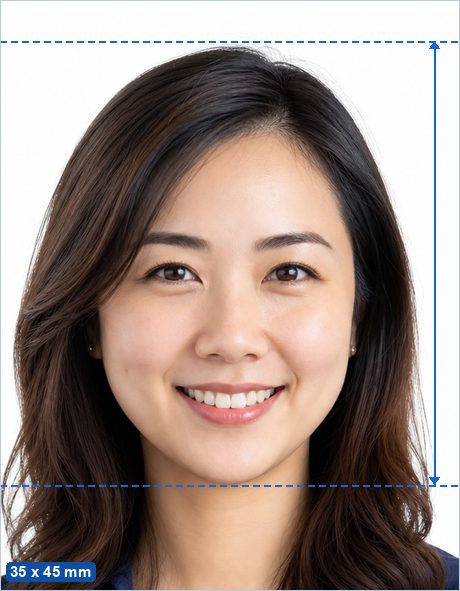
Canadian visitor visa, study permit, and work permit applications use a 35 x 45 mm photo — note this is smaller than the 50 x 70 mm Canadian passport format. The face must measure 31–36 mm from chin to crown, on a plain white or light-colored background.
Make my Canada Visa Photo now →
Not sure whether your photo will pass? See Why ID photos get rejected.
Canada Visa Photo requirements
| Photo size | 35 x 45 mm (1.38 x 1.77 in) |
|---|---|
| Pixels (print) | 413 x 531 px at 300 DPI · 827 x 1063 px at 600 DPI |
| Head height | 31–36 mm from chin to crown — official published figure. |
| Background | Plain white or any plain light color. |
| Glasses | Allowed if there is no glare, no tint, and the frames do not cover the eyes. |
| Editing | Must be original and unedited — retouching, filters and replaced backgrounds are explicitly banned for this document. |
| Expression | Neutral expression, mouth closed, both eyes open, facing the camera straight on. |
| Official source | Official photo requirements ↗ |
Good to know
Don't mix the two Canadian formats up: passports (and citizenship applications) use 50 x 70 mm, while temporary-residence visa applications use 35 x 45 mm. This page's button opens the maker preset to the visa size; use the Canadian Passport page for the 50 x 70 mm format.
IRCC online applications accept the digital JPG directly — upload the single photo rather than the print sheet.
How to make it in 3 steps
- Take or choose a photo. Stand in front of a plain light wall in even light with no shadows, camera at eye level about 2 m away, head and shoulders in frame with space around your head.
- Crop with the head guides. The maker opens preset to the 35 x 45 mm standard with the official 31–36 mm head range marked. Drag and zoom until the crown of your head and your chin sit on the guides, then run the built-in photo check.
- Download. Save the single photo (for online uploads) or the 4 x 6 in print sheet, and print it at any photo shop, pharmacy photo kiosk or at home for the price of a regular photo print.
Frequently asked questions
What size is a Canada Visa Photo?
35 x 45 mm — 413 x 531 px at 300 DPI. The head must measure 31–36 mm from chin to the top of the head.
What background color does a Canada Visa Photo need?
Plain white or any plain light color.
Can I take a Canada Visa Photo at home with my phone?
Yes. Stand in front of a plain light wall in even daylight, have someone take a sharp, front-facing photo from about 2 m away, then crop it to the exact 35 x 45 mm standard with the free maker — the head guides show you the official head-height range.
Is this Canada Visa Photo maker really free and private?
Yes — completely free, with no ads, no watermark and no signup. Unlike photo-booth apps and paid services, your photo is processed entirely in your browser and is never uploaded to any server.
Where can I print my Canada Visa Photo?
Download the 4 x 6 in (10 x 15 cm) sheet and print it as an ordinary borderless 4 x 6 in (10 x 15 cm) photo at actual size (100%, no scaling) at a photo shop, a pharmacy photo kiosk, an online print service or on a home printer, then cut along the guide lines. You pay only for an ordinary photo print, not a photo-booth service fee. More detail: Printing passport photos in Canada.
Is the Canada visa photo the same size as the Canada passport photo?
No. Visa (temporary residence) photos are 35 x 45 mm; passport photos are 50 x 70 mm. Make sure you use the size matching your application.