Make your photo now
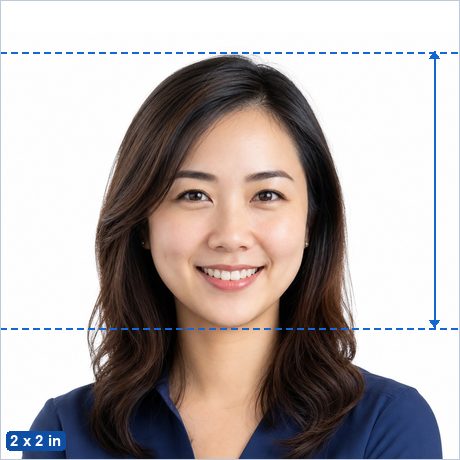
Need a U.S. Passport Photo? Upload any sharp, front-facing portrait and this free maker crops it to the exact 2 x 2 in (51 x 51 mm) standard with the official head-height guides, checks it against the published rules, and gives you both a digital photo and a print-ready 4 x 6 in sheet — entirely in your browser, with no ads and no watermark.
Make my U.S. Passport Photo now →
Not sure whether your photo will pass? See Why ID photos get rejected.
U.S. Passport Photo requirements
| Photo size | 2 x 2 in (51 x 51 mm) |
|---|---|
| Pixels (print) | 600 x 600 px at 300 DPI · 1200 x 1200 px at 600 DPI |
| Head height | 25–35 mm from chin to crown — official published figure. |
| Eye line | 28–35 mm from the bottom edge (official figure — checked automatically by the photo check panel). |
| Background | Plain white or off-white. |
| Glasses | Not allowed — remove glasses for this photo. |
| Editing | Must be original and unedited — retouching, filters and replaced backgrounds are explicitly banned for this document. |
| Expression | Eyes open, mouth closed, facing the camera straight on — smiling is fine, but avoid exaggerated expressions. |
| Official source | Official photo requirements ↗ |
Good to know
The same 2 x 2 inch photo is used for U.S. passport books, passport cards, visa applications (form DS-160/DS-260 print photos), and most other State Department documents.
The State Department requires an original, unedited photo: no filters, no retouching, and no digitally replaced background. Photograph yourself in front of a real white wall in even light, and leave this app's background replacement turned off and brightness/contrast at 100%.
United States specifics
Do you bring your own photo for a U.S. passport?
Yes, for any paper application. If you apply in person with Form DS-11 or renew by mail with Form DS-82, you attach one printed color photo, 2 x 2 inches, taken in the last 6 months. The State Department lists three ways to get it: an acceptance facility can take the photo when you apply, any company that offers photo services can take it, or a friend or family member can take it. Fees differ by location.
If you renew online, there is no print at all. You upload a JPG, JPEG, PNG, HEIC or HEIF file between 54 KB and 10 MB and crop it inside the application. The free maker covers both routes: download the single 2 x 2 image for the online upload, or the 4 x 6 inch sheet with two photos for a paper application. Cropping is allowed, but do not replace the background, retouch skin or remove red eye. The State Department rejects any digital change and says it checks every photo for AI tools.
Where to print a U.S. passport photo in the United States
Order the 4 x 6 inch sheet as a normal 4 x 6 print at any photo counter or kiosk, then cut out the two 2 x 2 photos. Use matte or glossy photo-quality paper. Photocopies, scans and prints with visible printer dots are refused. If you prefer to have the photo taken for you:
- Walgreens: USD 16.99 (2026) for two 2 x 2 prints with a digital copy by email, in store, no appointment.
- Walmart Photo Center: USD 7.64 (2026), taken and printed in store at locations that have a Photo Center.
- USPS: USD 15.00 (2026) photo fee at many, though not all, Post Offices that accept passport applications. You can book a photo-only appointment.
- CVS: offers passport photos, but its page showed no price when checked, so none is quoted here.
Why the State Department rejects passport photos
- Head measures less than 1 inch or more than 1 3/8 inches (25 to 35 mm), or is off center.
- Shadows on the face or wall, or lighting that is too bright or too dim.
- Background that is not plain white or off-white, or has texture, lines or objects.
- Blurry, grainy or pixelated print, red eye, or a photocopy or scan.
- Edited image: filters, apps, AI tools, a swapped background, or a stretched crop.
- Eyeglasses, sunglasses, hats, head coverings, headphones or a face mask without a signed medical or religious statement.
- Open mouth, closed eyes, tilted head, or a photo older than 6 months.
Official source, verified 3 September 2026
The rules above come from the State Department's Passport Photos page (Last Updated March 24, 2026) and its Uploading a Digital Photo page (Last Updated May 04, 2026), cross-checked against the Form DS-11 instructions. The live travel.state.gov pages block automated access, so the text was read on the State Department's identical mirror at adoption.state.gov on 3 September 2026.
Checked against the official source on 2026-09-03.
Sources
- travel.state.gov/en/passports/apply/help/photos.html
- adoption.state.gov/en/passports/apply/help/photos.html
- travel.state.gov/en/passports/renew-replace/online/upload-digital-photo.html
- adoption.state.gov/en/passports/renew-replace/online/upload-digital-photo.html
- common.usembassy.gov/wp-content/uploads/sites/129/2024/01/ds11.pdf
- photo.walgreens.com/store/passport-photos
- photos3.walmart.com/category/83-passport-photos?product=203-passport-photos&theme=fuji
- usps.com/international/passports.htm
- cvs.com/photo/passport-photos
How to make it in 3 steps
- Take or choose a photo. Stand in front of a plain light wall in even light with no shadows, camera at eye level about 2 m away, head and shoulders in frame with space around your head.
- Crop with the head guides. The maker opens preset to the 2 x 2 in (51 x 51 mm) standard with the official 25–35 mm head range marked. Drag and zoom until the crown of your head and your chin sit on the guides, then run the built-in photo check.
- Download. Save the single photo (for online uploads) or the 4 x 6 in print sheet, and print it at CVS, Walgreens, any pharmacy kiosk or at home for the price of a regular photo print.
Frequently asked questions
What size is a U.S. Passport Photo?
2 x 2 in (51 x 51 mm) — 600 x 600 px at 300 DPI. The head must measure 25–35 mm from chin to the top of the head.
What background color does a U.S. Passport Photo need?
Plain white or off-white.
Can I take a U.S. Passport Photo at home with my phone?
Yes. Stand in front of a plain light wall in even daylight, have someone take a sharp, front-facing photo from about 2 m away, then crop it to the exact 2 x 2 in (51 x 51 mm) standard with the free maker — the head guides show you the official head-height range.
Is this U.S. Passport Photo maker really free and private?
Yes — completely free, with no ads, no watermark and no signup. Unlike photo-booth apps and paid services, your photo is processed entirely in your browser and is never uploaded to any server.
Where can I print my U.S. Passport Photo?
Download the 4 x 6 in (10 x 15 cm) sheet and print it as an ordinary borderless 4 x 6 in (10 x 15 cm) photo at actual size (100%, no scaling) at a photo shop, a pharmacy photo kiosk, an online print service or on a home printer, then cut along the guide lines. You pay only for an ordinary photo print, not a photo-booth service fee. Local examples: Walgreens Photo, Walmart Photo Center, CVS Photo, USPS. More detail: Printing passport photos in the United States.