Make your photo now
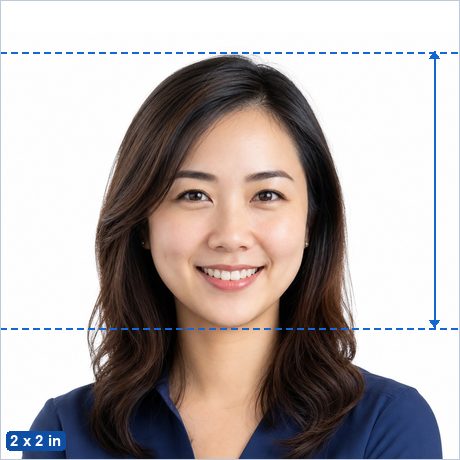
USCIS applications — green card (Form I-485), work permit (I-765), advance parole (I-131), naturalization (N-400) — use the standard U.S. 2 x 2 inch passport-style photo: head 25–35 mm tall, plain white background, no glasses, taken within the last 30 days for most forms.
Make my Green Card Photo (USCIS) now →
Not sure whether your photo will pass? See Why ID photos get rejected.
Green Card Photo (USCIS) requirements
| Photo size | 2 x 2 in (51 x 51 mm) |
|---|---|
| Pixels (print) | 600 x 600 px at 300 DPI · 1200 x 1200 px at 600 DPI |
| Head height | 25–35 mm from chin to crown — official published figure. |
| Background | Plain white or off-white or cream. |
| Glasses | Not allowed — remove glasses for this photo. |
| Editing | Must be original and unedited — retouching, filters and replaced backgrounds are explicitly banned for this document. |
| Expression | Neutral expression, mouth closed, both eyes open, facing the camera straight on. |
| Official source | Official photo requirements ↗ |
Good to know
Most USCIS forms ask for two identical prints with your name and A-number written lightly in pencil on the back. Print the 4 x 6 inch sheet, cut two photos, and label them.
How to make it in 3 steps
- Take or choose a photo. Stand in front of a plain light wall in even light with no shadows, camera at eye level about 2 m away, head and shoulders in frame with space around your head.
- Crop with the head guides. The maker opens preset to the 2 x 2 in (51 x 51 mm) standard with the official 25–35 mm head range marked. Drag and zoom until the crown of your head and your chin sit on the guides, then run the built-in photo check.
- Download. Save the single photo (for online uploads) or the 4 x 6 in print sheet, and print it at CVS, Walgreens, any pharmacy kiosk or at home for the price of a regular photo print.
Frequently asked questions
What size is a Green Card Photo (USCIS)?
2 x 2 in (51 x 51 mm) — 600 x 600 px at 300 DPI. The head must measure 25–35 mm from chin to the top of the head.
What background color does a Green Card Photo (USCIS) need?
Plain white or off-white or cream.
Can I take a Green Card Photo (USCIS) at home with my phone?
Yes. Stand in front of a plain light wall in even daylight, have someone take a sharp, front-facing photo from about 2 m away, then crop it to the exact 2 x 2 in (51 x 51 mm) standard with the free maker — the head guides show you the official head-height range.
Is this Green Card Photo (USCIS) maker really free and private?
Yes — completely free, with no ads, no watermark and no signup. Unlike photo-booth apps and paid services, your photo is processed entirely in your browser and is never uploaded to any server.
Where can I print my Green Card Photo (USCIS)?
Download the 4 x 6 in (10 x 15 cm) sheet and print it as an ordinary borderless 4 x 6 in (10 x 15 cm) photo at actual size (100%, no scaling) at a photo shop, a pharmacy photo kiosk, an online print service or on a home printer, then cut along the guide lines. You pay only for an ordinary photo print, not a photo-booth service fee. Local examples: Walgreens Photo, Walmart Photo Center, CVS Photo, USPS. More detail: Printing passport photos in the United States.
How many photos does USCIS need?
Typically two identical 2 x 2 inch prints per applicant (check your form's instructions). One 4 x 6 inch sheet from this app contains six photos — enough for the application plus spares.