Make your photo now
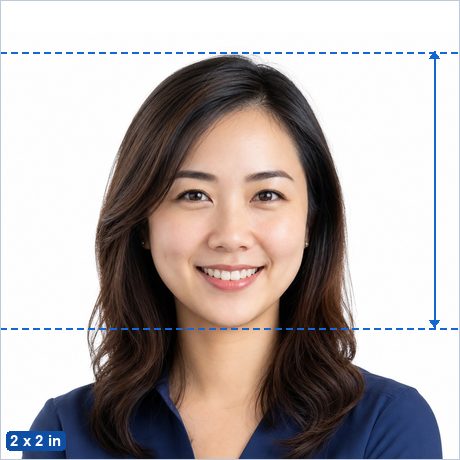
The Indian visa application — including the e-Visa applied for online — uses a square 2 x 2 inch (51 x 51 mm) photo on a plain white background, with the face centred and clearly visible. The online portal additionally accepts a square digital JPEG, which the maker produces at 600 x 600 pixels at 300 DPI or 1200 x 1200 at 600 DPI.
Make my Indian Visa Photo now →
Not sure whether your photo will pass? See Why ID photos get rejected.
Indian Visa Photo requirements
| Photo size | 2 x 2 in (51 x 51 mm) |
|---|---|
| Pixels (print) | 600 x 600 px at 300 DPI · 1200 x 1200 px at 600 DPI |
| Head height | 25–35 mm from chin to crown — typical ICAO guidance (not separately published for this document). |
| Background | Plain white. |
| Glasses | Allowed if there is no glare, no tint, and the frames do not cover the eyes. |
| Editing | Keep edits minimal; most authorities reject retouched photos even where no explicit rule is published. |
| Expression | Neutral expression, mouth closed, both eyes open, facing the camera straight on. |
| Official source | Official photo requirements ↗ |
Good to know
The e-Visa portal has historically been strict about file size and about backgrounds that are not plainly white. If an upload is refused, try the 300 DPI export and confirm the background is white rather than very light grey.
Applications made on paper at a consulate normally need two identical prints. One 4 x 6 inch sheet from this app contains four 2 x 2 inch photos.
How to make it in 3 steps
- Take or choose a photo. Stand in front of a plain light wall in even light with no shadows, camera at eye level about 2 m away, head and shoulders in frame with space around your head.
- Crop with the head guides. The maker opens preset to the 2 x 2 in (51 x 51 mm) standard with the official 25–35 mm head range marked. Drag and zoom until the crown of your head and your chin sit on the guides, then run the built-in photo check.
- Download. Save the single photo (for online uploads) or the 4 x 6 in print sheet, and print it at any photo shop, pharmacy photo kiosk or at home for the price of a regular photo print.
Frequently asked questions
What size is a Indian Visa Photo?
2 x 2 in (51 x 51 mm) — 600 x 600 px at 300 DPI. The head must measure 25–35 mm from chin to the top of the head.
What background color does a Indian Visa Photo need?
Plain white.
Can I take a Indian Visa Photo at home with my phone?
Yes. Stand in front of a plain light wall in even daylight, have someone take a sharp, front-facing photo from about 2 m away, then crop it to the exact 2 x 2 in (51 x 51 mm) standard with the free maker — the head guides show you the official head-height range.
Is this Indian Visa Photo maker really free and private?
Yes — completely free, with no ads, no watermark and no signup. Unlike photo-booth apps and paid services, your photo is processed entirely in your browser and is never uploaded to any server.
Where can I print my Indian Visa Photo?
Download the 4 x 6 in (10 x 15 cm) sheet and print it as an ordinary borderless 4 x 6 in (10 x 15 cm) photo at actual size (100%, no scaling) at a photo shop, a pharmacy photo kiosk, an online print service or on a home printer, then cut along the guide lines. You pay only for an ordinary photo print, not a photo-booth service fee. Local examples: Printo, GiftKida, Photojaanic. More detail: Printing passport photos in India.
What size photo is needed for an Indian visa?
2 x 2 inches (51 x 51 mm), square, on a plain white background. The online e-Visa portal accepts the same geometry as a digital JPEG, at least 600 x 600 pixels.
Is the Indian visa photo the same as the OCI card photo?
The size is the same — both are 2 x 2 inch squares on a white background — so the same crop works for either. The OCI application has its own published photo specification, which the OCI page covers separately.