Make your photo now
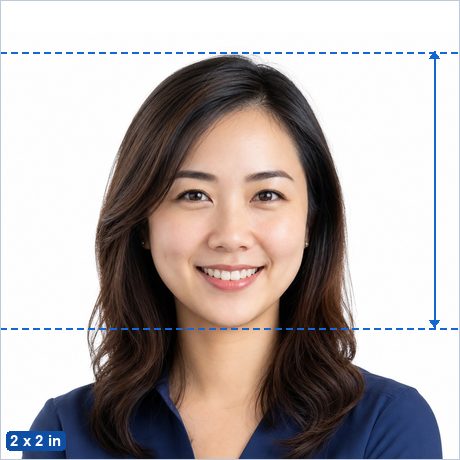
Renewing your passport online means uploading a single digital photo instead of mailing prints. This free maker crops your photo to the exact standard, checks it against the published rules, and saves a file that meets the upload requirements — entirely in your browser, with no ads and no watermark.
Make my U.S. Passport Online Renewal Photo now →
Not sure whether your photo will pass? See Why ID photos get rejected.
U.S. Passport Online Renewal Photo requirements
| Photo size | 2 x 2 in (51 x 51 mm) |
|---|---|
| Digital file | Square JPEG, 54 KB – 10 MB (JPG, PNG, HEIC and HEIF are also accepted) — the file this app saves meets the format and size rules automatically. |
| Head height | 25–35 mm from chin to crown — official published figure. |
| Eye line | 28.6–34.9 mm from the bottom edge (official figure — checked automatically by the photo check panel). |
| Background | Plain white or off-white or cream. |
| Glasses | Not allowed — remove glasses for this photo. |
| Editing | Must be original and unedited — retouching, filters and replaced backgrounds are explicitly banned for this document. |
| Expression | Neutral expression, mouth closed, both eyes open, facing the camera straight on. |
| Official source | Official photo requirements ↗ |
Good to know
Online passport renewal is fully digital — you upload one square JPEG instead of mailing prints. The upload tool auto-checks every photo and a State Department employee reviews it again, so a compliant photo is the difference between a smooth renewal and weeks on hold.
The photo must be original and unedited (no filters, retouching, AI tools, or replaced backgrounds — every photo is checked), taken in the last 6 months, against a real plain white or off-white wall. This app keeps the file within the accepted 54 KB – 10 MB range automatically.
How to make it in 3 steps
- Take or choose a photo. Stand in front of a plain light wall in even light with no shadows, camera at eye level about 2 m away, head and shoulders in frame with space around your head.
- Crop with the head guides. The maker opens preset to the 2 x 2 in (51 x 51 mm) standard with the official 25–35 mm head range marked. Drag and zoom until the crown of your head and your chin sit on the guides, then run the built-in photo check.
- Download. Save the digital photo file — it already meets the upload format and file-size rules.
Frequently asked questions
What size is a U.S. Passport Online Renewal Photo?
2 x 2 in (51 x 51 mm) — 600 x 600 px at 300 DPI. The head must measure 25–35 mm from chin to the top of the head.
What background color does a U.S. Passport Online Renewal Photo need?
Plain white or off-white or cream.
Can I take a U.S. Passport Online Renewal Photo at home with my phone?
Yes. Stand in front of a plain light wall in even daylight, have someone take a sharp, front-facing photo from about 2 m away, then crop it to the exact 2 x 2 in (51 x 51 mm) standard with the free maker — the head guides show you the official head-height range.
Is this U.S. Passport Online Renewal Photo maker really free and private?
Yes — completely free, with no ads, no watermark and no signup. Unlike photo-booth apps and paid services, your photo is processed entirely in your browser and is never uploaded to any server.